Stop Reviewing the Board Pack in Email and Teams
Outlook and Teams are excellent for getting someone’s attention. They are a poor system of record for “where did this margin come from?” — especially when the answer has to travel with the model and the deck.
Most FP&A review does not fail because people refuse to collaborate. It fails because collaboration is scattered across four apps that do not share a single place for the question, the evidence, and the slide status.
The numbers live in Excel. The narrative lives in PowerPoint. The ping lives in Teams. The long reply — with the supporting email attached — lives in Outlook. By Thursday before the board, nobody is sure which of those is authoritative.
A familiar week
Here is a workflow that shows up in almost every mid-market finance team. The tools change; the pattern does not.
Monday — Excel. The model is refreshed. An analyst notices the EBITDA margin moved more than expected. They leave a native Excel comment, or they screenshot the cell and drop it into a Teams channel: “Can someone check G47?” The thread in Teams fills with reactions. The cell itself stays quiet.
Tuesday — Outlook. A controller forwards last quarter’s explanation as an email attachment. Someone replies-all with a revised view. The workbook on the shared drive still has Monday’s open question — or no question at all. The evidence is now in two mailboxes and a chat history search will not reliably find.
Wednesday — PowerPoint. Charts are pasted or linked into the pack. Half the deck is ready; half is not. There is no consistent visual signal on the file. One person sends “v3_FINAL_for_review.pptx” while another is still editing “Board pack — working.pptx”. A stakeholder opens the wrong copy in a meeting.
Thursday — external rehearsal. Legal or IR asks to hide one sensitive row on a backup slide before an outside advisor joins. Someone deletes the text, or covers it with a black rectangle that may or may not survive the next paste. The working file and the “clean” file diverge again.
Friday — send. Draft watermarks are still on three slides. An open margin question was “resolved” in Teams but never marked on the model. The board pack leaves with confidence the process did not actually earn.
What breaks in that loop
Three separate problems get treated as one “collaboration” complaint:
- Questions lose their anchor. Chat and email are great for notification. They are weak at pointing at this cell, keeping a screenshot and the source message with the answer, and surviving the next person who opens the workbook on another PC.
- Deck status is tribal knowledge. Without a visible DRAFT / FOR REVIEW / CONFIDENTIAL mark on the slides themselves, version names in OneDrive or SharePoint become the only signal — and version names lie.
- Sensitivity is handled ad hoc. Hiding content for a rehearsal is not the same as permanently destroying it for an external send. Mixing the two creates either accidental disclosure or irreversible edits on the working deck.
Native Excel comments help for short notes. They do not replace a review workflow with statuses, attachments, and a trail someone can still read next month. Teams and Outlook should stay in the process — as the place you ping people — not as the place the answer permanently lives.
Keep the question on the cell
The fix for the Monday/Tuesday mess is deliberate: put the discussion where the number is.
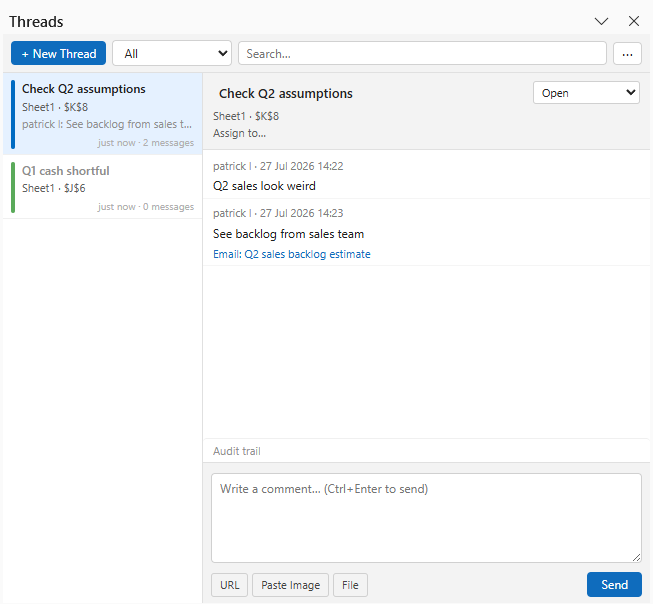
In practice that means a thread anchored to a cell or range inside the workbook — with replies, optional assignee, and a real status path (open → pending review → pending info → resolved), not only a resolve checkbox. Attachments matter as much as text: a screenshot of the variance bridge, a dragged-in Outlook message, a URL to the supporting schedule. When the .xlsx moves, the review moves with it. Nothing about that conversation needs to sit on a vendor server.
Navifia’s Threads are built for exactly that pattern. Excel’s native comments still exist for quick notes; Threads are for evidence-backed review. In PowerPoint, open questions on a linked shape’s source workbook can surface in the standalone Threads pane — so the person finishing the deck sees unresolved work without hunting Teams history.
Teams does not disappear. A practical habit is to send a short Teams ping that points to the cell (for example, “please review the thread on G47”), then keep the actual discussion on that cell. Chat notifies; the workbook holds the record.
Make deck status visible on the slides
The Wednesday problem is status that only exists in the filename. Filenames are easy to ignore in a meeting; a diagonal DRAFT or FOR REVIEW stamp on the slide is not.
A lightweight stamp habit works well for finance packs:
- Working slides get DRAFT or PENDING INFORMATION while numbers are still moving.
- Slides in controller review get FOR REVIEW.
- Anything that must not forward externally gets CONFIDENTIAL or DO NOT DISTRIBUTE.
- When the pack is ready, hide or delete stamps on the working deck — or strip them from a distribution copy so the working file can keep its review marks for next month.
Navifia’s Stamps sit on the PowerPoint Tools group for that lifecycle: presets, custom text, hide/show per slide or whole deck, and delete when you are done. Pair them with a clean send path (a finalized copy without link metadata or stamps) so “working” and “board” never share the same file by accident.
Redact for the room you are in
Thursday’s sensitivity problem needs two different tools, and teams often only have one instinct: delete or black-box forever.
- Temporary cover — hide a selection for an internal rehearsal or an advisor walkthrough, then remove the cover when the room clears. Reversible on purpose.
- Permanent redact — destroy the underlying text or picture when the file will leave the firm and that content must not be recoverable. Use only when you mean it.
Navifia’s Redact separates those modes (cover vs. permanent, plus remove-cover for the temporary path). That is not a substitute for legal hold or enterprise DLP. It is a practical way to stop the working deck and the external deck from being edited by guesswork five minutes before the call.
How the pieces fit in one close
Put together, the week is a clearer handoff:
- Model questions land as Threads on the cells they are about; Outlook messages that matter get attached as evidence, not as the only copy of the answer.
- Teams stays the notification layer — short pings that point back to the workbook.
- The PowerPoint pack carries Stamps so anyone opening the file knows whether it is draft, in review, or restricted.
- Before an external session, Redact covers (or permanently removes) what that audience must not see.
- Before the board send, clear open threads you still care about, strip stamps from the distribution copy, and keep the working files intact for next month.
You still use Excel, PowerPoint, Outlook, and Teams. You stop asking any one of them to be the entire review system.
What this is not
This is not a call to abandon Microsoft 365 collaboration features. Co-authoring, @mentions, and channel posts remain useful. It is a call to stop treating chat history as the audit trail for a number that has to survive into next quarter’s pack.
If your pain is stale charts, start with linking and push-refresh. If your pain is silent period labels, start with a pre-send checklist. If your pain is “we debated this for three days and still cannot find the thread,” start with review that lives on the numbers — and deck status that lives on the slides.