Excel · Keyboard shortcuts
Open the list anytime with Ctrl+Alt+/ (same chord in PowerPoint). Dialog: Navifia — Keyboard Shortcuts. Also: Config → Keyboard Shortcuts.
When to use it: learn defaults, disable a chord that fights Excel, or rebind for your house style.
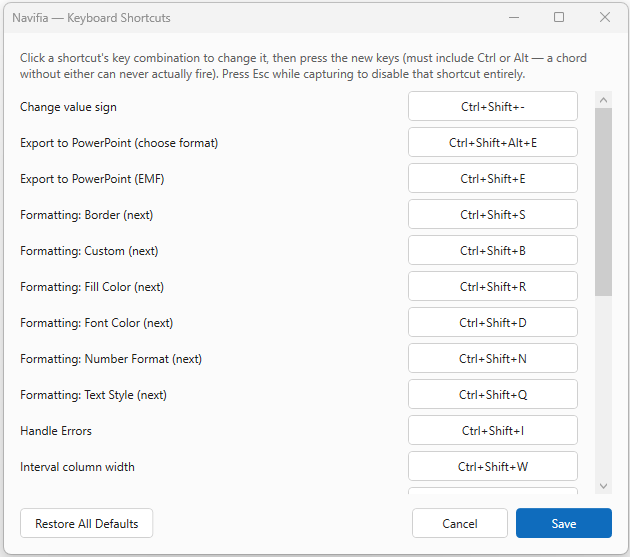
1. Rebind
- Press Ctrl+Alt+/ (or Configure → Keyboard Shortcuts).
- Click the chord next to an action → press a new combination (must include
CtrlorAlt), or Esc to disable. - Save — conflicts (same chord twice) are blocked. No restart needed.
2. Default chords
Fresh installs also auto-import factory-setup-excel.navifia.json once (see Configure); that bundle matches the chords below.
| Action | Chord |
|---|---|
| Export to PowerPoint (EMF) | Ctrl+Shift+E |
| Export to PowerPoint (choose format) | Ctrl+Alt+Shift+E |
| Push updates | Ctrl+Shift+P |
| Paste same formula | Ctrl+Shift+F |
| Handle errors | Ctrl+Shift+I |
| Variance % | Ctrl+Shift+V |
| Threads pane | Ctrl+Shift+T |
| Spotlight | Ctrl+Shift+L |
| Change value sign (Negate) | Ctrl+Shift+− |
| Interval column width (toggle vs default) | Ctrl+Shift+W |
| Interval row height (toggle vs default) | Ctrl+Shift+H |
| Smart formatting — Number Format | Ctrl+Shift+N |
| Smart formatting — Text Style | Ctrl+Shift+Q |
| Smart formatting — Border | Ctrl+Shift+B |
| Smart formatting — Fill Color | Ctrl+Shift+R |
| Smart formatting — Font Color | Ctrl+Shift+D |
| Smart formatting — Custom | Ctrl+Shift+S |
| Trace Precedents / Dependents | Alt+← / Alt+→ |
| Trace next / previous target | Alt+↓ / Alt+↑ |
| Keyboard shortcuts list | Ctrl+Alt+/ |
Formula-audit Alt arrows only act while a trace is relevant; otherwise they fall through to Excel.
Smart formatting behaviour: Smart formatting. PowerPoint chords: PowerPoint · Keyboard shortcuts.
3. Share with the team
Shortcut overrides travel in Excel Export setup / Import setup — see Configure.
Troubleshooting
- Shortcut does nothing — disabled or rebound here; check conflicts; license must be active for most actions.
- Conflicts with Excel — pick another chord (e.g. native Filter is also Ctrl+Shift+L; Navifia wins while the add-in is loaded).